The best vehicle diagnostic scan tool depends on which systems you need to check. The ANCEL AD310 is best for basic check-engine diagnostics, while the FOXWELL NT604 Elite adds engine, ABS, SRS, and transmission scans. The Innova 5610 and BLCKTEC 460T are better suited to advanced troubleshooting, but their vehicle-specific features should be verified before purchase.
| Scan tool | Best for | Notable capabilities |
|---|---|---|
| ANCEL AD310 | Basic engine-code checks | Reads and clears codes, live data, freeze frame |
| FOXWELL NT301 | Check-engine light and readiness checks | Code reading, clearing, I/M readiness indicator |
| FOXWELL NT604 Elite | Multiple common vehicle systems | Engine, ABS, SRS, and transmission diagnostics |
| ANCEL AD410 | Everyday DIY diagnostics | Live data, code definitions, O2 and EVAP tests |
| Innova 5610 | Advanced repair work | Bidirectional controls and select reset functions |
ANCEL AD310 Classic OBD II Scanner
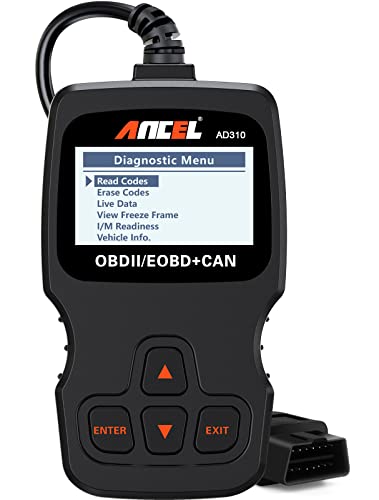
Best for: Drivers who want a straightforward, corded tool for checking an engine warning light. The AD310 reads and clears emission-related trouble codes and displays live data, freeze-frame information, I/M readiness, and vehicle information.
Its labeled buttons and large screen are designed for direct operation, and it draws power through the vehicle’s OBD II connector rather than a separate battery or charger. The 2.5-foot cable and compact body make it practical to store with basic car tools.
Why it was selected: It covers common engine diagnostics without adding advanced-system features that many occasional users may not need. Limitation: The listed functions focus on OBD II engine and emissions diagnostics, not broad ABS, SRS, or transmission scanning.
FOXWELL NT301 Check-Engine Scanner

Best for: Owners focused on check-engine codes and emissions readiness. The NT301 reads and clears engine diagnostic trouble codes and provides one-touch I/M readiness checks, with red, yellow, and green indicators to show readiness status.
The scanner plugs into the vehicle’s 16-pin diagnostic connector and includes a speaker for audio feedback. Its stated purpose is to help users identify a fault and check whether a repair has resolved it. Clearing a code does not repair the cause; an unresolved fault may return.
Why it was selected: Its readiness indicators make it a useful choice for drivers preparing to check emissions-test status. Limitation: The supplied feature information centers on engine codes and readiness, so choose a multi-system scanner if you need ABS, SRS, or transmission diagnostics.
FOXWELL NT604 Elite Multi-System Scanner

Best for: Drivers who want to scan more than the engine system. The NT604 Elite checks engine, ABS, SRS, and transmission systems, and also offers live data, an onboard DTC library, playback, printing, and an I/M readiness menu.
The listed software is ready to use without an initial download. It can read and clear common SRS fault codes that are not caused by a crash, but the manufacturer notes that crash or collision data cannot be cleared.
Why it was selected: It offers a wider diagnostic range than a basic engine-code reader while remaining oriented toward car owners. Limitation: It does not support maintenance functions such as resets or relearns, and it is a diagnostic tool rather than a repair device.
ANCEL AD410 Enhanced OBD2 Scanner

Best for: DIY users who want engine-code explanations and more diagnostic checks than a basic reader provides. The AD410 reads and clears codes, displays code definitions, and supports live data, freeze frame, I/M readiness, O2 sensor tests, EVAP tests, vehicle information, and MIL status.
Its built-in database includes more than 42,000 DTC lookups, according to the product information. Live readings can include RPM, coolant temperature, fuel trim, and oxygen sensor data, depending on the vehicle’s available information.
Why it was selected: The combination of code definitions and live-data functions can help users investigate an engine issue before speaking with a repair shop. Limitation: The listed functions are OBD II-focused; verify system coverage if you need diagnostics beyond engine and emissions data.
Innova 5610 Bidirectional Scan Tool

Best for: Experienced DIY mechanics and repair users who need more than code reading. The Innova 5610 provides OBD II and OEM live data, enhanced data streams for systems such as ABS, SRS, transmission, and engine, plus select special reset and relearn procedures.
Its bidirectional controls can send commands for supported tests, such as switching a fuel pump on or off or retracting an electronic parking brake. These functions can help with troubleshooting, but they depend on vehicle make and model.
Why it was selected: It offers active testing and advanced data access for users performing hands-on diagnostics. Limitation: The product is not universal; confirm compatibility with the specific vehicle before relying on its advanced functions.
Buying Guide: How To Choose A Vehicle Diagnostic Scan Tool
Do you only need to check the check-engine light?
A basic OBD II reader is often sufficient for reading engine trouble codes, clearing codes after a repair, and checking emissions readiness. The AD310 and NT301 are better fits for this purpose. Remember that clearing a code does not fix the underlying mechanical or electrical problem.
Which vehicle systems should the scanner cover?
Confirm whether you need engine-only diagnosis or access to ABS, SRS, and transmission systems. The NT604 Elite lists these four system areas. Advanced scanners may offer broader coverage, but available functions can vary by vehicle.
Would live data or active tests help?
Live data displays readings such as RPM and coolant temperature when supported by the vehicle. Active, bidirectional tests send commands to vehicle components and are generally more useful for repair work. The Innova 5610 includes bidirectional controls, but its capabilities are vehicle-dependent.
How important are setup and operation?
Consider whether you prefer a plug-in handheld unit, a clear screen, labeled buttons, or readiness indicators. Corded scanners in this list receive power from the vehicle’s diagnostic connector. Check the product details for the connection and operating setup that suit your needs.
What should you verify before buying?
Check the vehicle’s year, make, and model against the scanner’s coverage information, especially for ABS, SRS, transmission, reset, and relearn functions. OBD II support does not guarantee that every enhanced feature works on every vehicle. Also distinguish code-reading capability from repair capability: a scan tool reports information, but it does not physically fix a fault.
Frequently Asked Questions
What does a vehicle diagnostic scan tool do?
It connects to a vehicle’s diagnostic port to retrieve supported trouble codes and, depending on the model, show live data, readiness status, or information from additional vehicle systems.
Can a scan tool turn off the check-engine light?
Many scanners can clear a code after a repair, but clearing it does not resolve the cause. If the problem remains, the code or warning light may return.
Are all OBD II scanners compatible with every car?
No. Basic OBD II compatibility does not ensure that every enhanced feature works. Check coverage for the vehicle’s year, make, model, and the systems you need to scan.
Can a scanner tell me exactly what repair to make?
A trouble code identifies a detected condition, not necessarily a single failed part. Use the code and supporting data as diagnostic information, then confirm the cause before replacing components.
Do scan tools need a battery?
The ANCEL AD310 and MOTOPOWER MP69033 product information says they draw power from the vehicle’s OBD II connector and do not require a separate battery or charger. Check the specifications for other models.