The best roof mount monitor for a car depends on screen size, media sources, and how many passengers need to see it. The XTRONS 14-inch Android model is a balanced choice for family vehicles, while its 17.3-inch Android model suits buyers who want a larger display. For smaller cabins, consider the 10.2-inch XTRONS. The Pyle 15.6-inch model adds IR and FM audio options, and the XTRONS 19.5-inch screen is aimed at larger vehicles.
| Monitor | Best for | Standout feature |
|---|---|---|
| XTRONS 14-inch Android | Families wanting apps in a mid-size screen | Android, HDMI, Wi-Fi |
| XTRONS 17.3-inch Android | Large cabins and shared viewing | 1080p display, 180-degree rotation |
| XTRONS 10.2-inch | Smaller cars | Compact 720p screen |
| Pyle 15.6-inch | Flexible audio output | IR transmitter and FM transmitter |
| XTRONS 19.5-inch | Buses, coaches, and motor homes | Large screen with HDMI, USB, and AV |
XTRONS 14-Inch Android Overhead Monitor

This 14-inch XTRONS is best for buyers who want a flip-down screen with Android features without choosing one of the largest displays. Its 1366 x 768 resolution and 120-degree rotation give rear passengers options for viewing angle. The listed features include HDMI, Wi-Fi, USB, RCA, wireless screen mirroring, and 2GB of memory with 32GB of storage.
The manufacturer describes APK app installation and playback of media in 4K, 1080p, or standard definition. Choose this model if app access and several input options matter. Its screen is smaller than the 17.3- and 19.5-inch options, so it may be less suitable when a very large display is the priority. Check installation dimensions and vehicle fit before buying.
XTRONS 17.3-Inch Android Overhead Monitor

This model is best for larger cabins where passengers benefit from a broad shared display. It has a 17.3-inch 1920 x 1080 screen that rotates up to 180 degrees. The listed connections include HDMI, USB, and RCA, and the product supports wireless screen mirroring. It also includes 2GB of memory and 32GB of storage.
Choose it if screen size, Full HD resolution, and adjustable viewing direction are more important than a compact installation. The Android system supports app installation through APK, according to the product description. A 17.3-inch screen takes more headliner space than smaller options, so confirm that the open screen will not interfere with the vehicle interior.
XTRONS 10.2-Inch Overhead Player

The 10.2-inch XTRONS is best for smaller cars or buyers who prefer a less expansive roof-mounted screen. Its 1280 x 720 display is paired with HDMI and Wi-Fi support. The product description also lists playback for 1080p-format video and formats including AVI, 3GP, MP4, MP3, and JPEG.
Built-in stereo speakers and Bluetooth audio transmission provide audio options without requiring separate speakers, according to the listed features. This is the better choice when cabin space is limited. Its screen is substantially smaller than the 15.6- and 17.3-inch alternatives, which may make it less suitable for viewing across a wide rear seating area.
Pyle 15.6-Inch Flip-Down Monitor
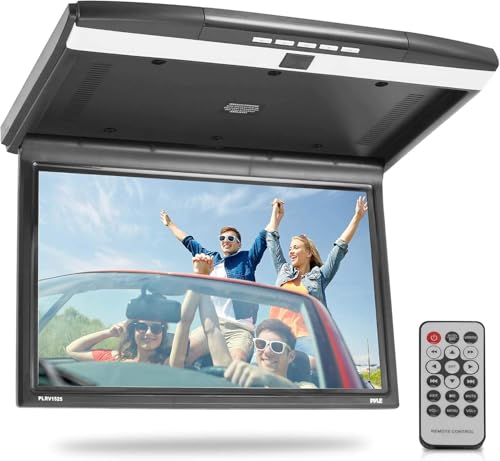
This Pyle monitor is best for buyers who want several ways to route audio. It has a 15.6-inch widescreen display with 1680 x 800 resolution, built-in stereo speakers, an IR transmitter for compatible IR headphones, and an FM transmitter for playing audio through the vehicle’s FM radio and speakers. Its listed connections include USB, SD, HDMI, and AV.
Choose this model if headphone or FM audio transmission is important to your setup. PAL/NTSC auto switching is also listed. The product information does not specify Android apps or wireless screen mirroring, so buyers seeking those particular functions should compare it with the XTRONS Android models.
XTRONS 19.5-Inch Large Overhead Monitor

The XTRONS 19.5-inch model is best for larger vehicles such as buses, coaches, and motor homes, as described by the manufacturer. Its 1600 x 900 TFT display supports 1080p video playback. HDMI, USB, and AV inputs let buyers connect different media sources, while listed file formats include MP4, AVI, MP3, and JPEG.
Choose it when a particularly large viewing area is the main requirement and the vehicle has enough space for the screen. It is the largest option in this selection, making it less suited to buyers who need a compact monitor. Confirm the screen’s physical dimensions and installation requirements for the vehicle before purchase.
Buying Guide: How To Choose A Roof Mount Monitor
What screen size fits the vehicle?
Measure the available roof and headliner area, and consider how the screen will sit when folded down. A 10.2-inch model is the compact choice here; 14- to 17.3-inch screens offer a larger viewing area; and 19.5 inches is intended for larger vehicles. Screen size alone does not confirm that a monitor will fit a specific vehicle.
Do you want apps, inputs, or local media playback?
Android models in this selection list app installation, Wi-Fi, and screen mirroring. Other monitors emphasize HDMI, USB, AV, or support for media files stored on connected devices. Check the product’s listed inputs against the devices and media sources you plan to use.
How will passengers hear the audio?
Built-in speakers can provide an onboard audio option. The Pyle 15.6-inch model also lists IR and FM transmitters, while some XTRONS models list Bluetooth audio transmission. Confirm that the intended headphones, audio system, or other equipment supports the chosen connection method.
What should you check before installation?
Review the monitor’s dimensions, mounting method, wiring needs, and available clearance with the screen open. Product descriptions do not establish fitment for every make and model. If you are unsure about roof mounting or electrical connections, consult a qualified installer before buying.
Frequently Asked Questions
What is a roof mount monitor for a car?
It is a screen mounted overhead, typically designed to fold down for rear-seat viewing and fold away when not in use.
Which screen size is best for a small car?
A smaller screen, such as the 10.2-inch XTRONS, may be easier to accommodate. Measure the installation area and check vehicle clearance before choosing.
Can an overhead monitor play video from an external device?
Some models list HDMI, USB, or AV inputs. Check the exact monitor’s connections and the output supported by the device you plan to connect.
Do these monitors include DVD players?
The product descriptions provided do not list a DVD drive for the five selected models. Check the full product specifications if a built-in DVD player is essential.
Can passengers use headphones?
Some models list audio transmission features, including IR or Bluetooth. Confirm headphone compatibility and the specific connection method in the product details.