Choosing a universal diagnostic scan tool helps you quickly identify why a check engine light is on, read live data, and clear codes. This guide highlights five reliable options that work with most 1996 and newer cars and trucks. Each pick offers a balance of ease of use, broad compatibility, and practical features for hobbyists and professional technicians alike.
Summary Of Selected Products
| Product | Brand | Key Benefit | Compatibility |
|---|---|---|---|
| AD310 Classic Enhanced Universal OBD II Scanner | ANCEL | Fast code reading/clearing; compact design | 1996+ OBDII/CAN |
| NT604 Elite OBD2 Scanner | FOXWELL | 5-in-1 diagnostics; ABS, SRS, transmission | OBDII vehicles |
| BlueDriver Bluetooth Pro | BlueDriver | Phone-based, repair guidance & live data | 1996+ OBDII |
| AD410 Enhanced OBD2 Scanner | ANCEL | Comprehensive OBDII diagnostics; EVAP/O2 tests | 1996+ OBDII/CAN |
| MOTOPOWER MP69033 | MOTOPOWER | Clear live data; 9 protocols supported | 1996+ OBDII/CAN |
Each option provides core OBDII functionality with varying extras such as live data visualization, I/M readiness, and advanced sensor testing. Use this table to compare breadth of features, system coverage, and how you prefer to access diagnostics—via handheld device or smartphone.
ANCEL AD310 Classic Enhanced Universal OBD II Scanner
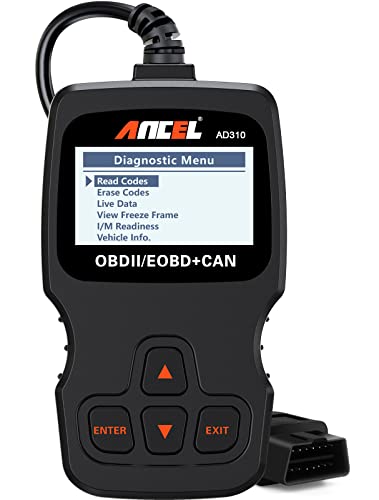
The AD310 is a compact, affordable option widely recommended for quick diagnostics. It reads and clears diagnostic trouble codes, displays live data and freeze frames, and shows I/M readiness. Its sturdy build includes a thick, flexible 2.5-foot cable and a compact footprint suitable for cramped engine bays. Power is drawn directly from the vehicle’s OBDII port, eliminating the need for extra batteries. Users can expect fast results when checking emission-related codes and quick feedback after repairs.
FOXWELL NT604 Elite OBD2 Diagnostic Scanner

The NT604 Elite is a 5-in-1 diagnostic tool designed for car owners who want to diagnose ABS, SRS airbags, transmission, and engine issues. The 2026 version ships with updated software and is ready to use out of the box, minimizing setup time. It includes an extensive DTC library, live data, data playback, and the ability to clear codes after repairs. Note: Airbag crash data cannot be cleared after airbag replacement, and it does not support maintenance functions beyond core diagnostics.
BlueDriver Bluetooth Pro OBDII Scan Tool
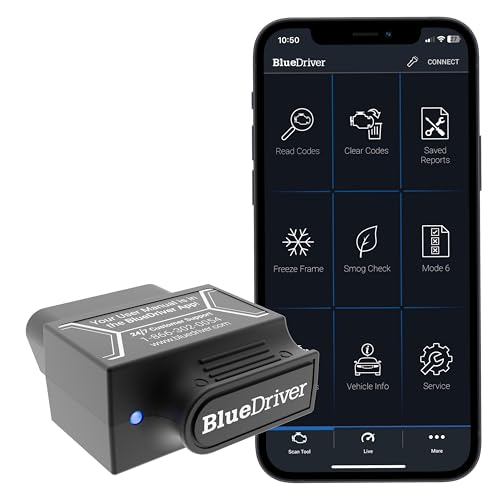
BlueDriver operates through a smartphone app, delivering professional-grade diagnostics without a separate display. It reads and clears codes, monitors live data, and provides repair reports with potential fixes. The device specializes in comprehensive checks for engine, ABS, SRS, and other systems, with ongoing health monitoring while driving. Its subscription-free model emphasizes long-term value, and the app’s repair guidance is a notable convenience for DIYers.
ANCEL AD410 Enhanced OBD2 Scanner

The AD410 expands diagnostic capability beyond basic codes, offering quick reads and clears of emission-related codes, plus enhanced OBDII diagnostics. It supports tests like O2 sensor monitoring and EVAP systems, enabling more precise tuning of the air/fuel mixture. While it focuses primarily on engine-related data, it provides useful insights for diagnosing fuel and emission-related concerns without requiring a battery or charger.
MOTOPOWER MP69033 OBD2 Scanner

MP69033 offers a broad protocol support, including 9 OBDII/CAN variants, and a clear 2.8″ LCD display for real-time data. It reads and erases codes, shows freeze frames and I/M readiness, and provides vehicle information and live data streams. Power is drawn directly from the vehicle, so there is no battery requirement. Its straightforward interface and multilingual support make it accessible to a wide audience.
Buying Guide: Key Purchase Considerations
- Vehicle compatibility: Ensure the tool supports 1996+ OBDII/CAN protocols for your make and model. Some tools excel in engine diagnostics but lack ABS/SRS or transmission checks.
- Ease of use: Handheld units are straightforward, while Bluetooth tools rely on a smartphone app. Consider your preferred workflow and whether you want live data, graphs, or repair guidance.
- Data depth: Look for a large DTC library and features like live data streaming, data logging, and the ability to retrieve VINs. More robust tools offer I/M readiness checks and special tests (EVAP, O2, etc.).
- Maintenance and updates: Some tools include free software updates for a period or subscription-based features. Decide whether ongoing updates are important for your needs.
- Cost vs value: Higher-end tools deliver more comprehensive diagnostics and support, but for basic checks, a budget option may suffice. Consider whether you need ABS/SRS tests or just engine codes.
- Interface and display: Larger screens with intuitive menus reduce guesswork. If you’re checking sensors while under the hood, a readable display or a clear app interface matters.
- Portability and durability: A compact, rugged design helps with on-the-road diagnostics, while a desktop setup might be fine for a home garage.