The best professional car diagnostic tool depends on how much vehicle information and repair control you need. The Innova 5610 is the strongest fit here for advanced troubleshooting because it offers bidirectional controls and select reset procedures. The FOXWELL NT604 Elite scans several major systems, while the ANCEL AD410 and FOXWELL NT301 focus on engine diagnostics and live data. These tools can help identify faults, but they do not replace repairs or guarantee that every function works with every vehicle.
| Tool | Best For | Standout Features |
|---|---|---|
| Innova 5610 | Advanced repair work | Bidirectional controls, OEM live data |
| FOXWELL NT604 Elite | Scanning multiple systems | Engine, ABS, SRS, transmission |
| ANCEL AD410 | Detailed engine diagnostics | Live data, O2 and EVAP tests |
| FOXWELL NT301 | Check-engine troubleshooting | I/M readiness indicator |
| ANCEL AD310 | Basic code reading | Read and clear engine codes |
Innova 5610 For Advanced Repairs

The Innova 5610 is the best choice in this group for users who need more than fault-code reading. Its listed functions include OBD2 and OEM live data, enhanced data streams for systems such as ABS, SRS, transmission, and engine, plus bidirectional controls. Those controls can command certain vehicle tests, including fuel-pump operation and electronic parking-brake retraction.
Best for: Experienced DIYers and repair professionals who want to investigate systems and perform supported active tests. It was selected for its combination of enhanced data, bidirectional operation, and select relearn procedures.
Limitation: Compatibility is limited to select makes and models, and the product is not universal. Confirm that the required functions are supported for the specific vehicle before choosing it.
FOXWELL NT604 Elite For Multiple Systems

The FOXWELL NT604 Elite reads common faults in the engine, ABS, SRS, and transmission systems. Its listed features also include live data, an onboard diagnostic trouble code library, playback, printing, and an I/M readiness menu. The product description says it comes with software installed, so setup does not require a software download before initial use.
Best for: Vehicle owners or technicians who want to check several major systems with one handheld scanner. It offers broader system coverage than an engine-only code reader.
Limitation: It does not support maintenance functions such as resets or relearns. For SRS, it cannot clear crash or collision data, and a fault must be repaired before its code can be cleared.
ANCEL AD410 For Detailed Engine Data

The ANCEL AD410 is an engine-focused scanner with more diagnostic detail than a basic code reader. Its listed functions include reading and clearing codes, viewing definitions, live data, freeze-frame information, I/M readiness, O2 sensor and EVAP tests, vehicle information, and MIL status. The built-in database lists more than 42,000 diagnostic trouble code lookups.
Best for: DIY users who want engine data and emissions-related checks to help investigate a check-engine light or verify a repair. It was selected for its range of OBD2 tests and live readings, including RPM, coolant temperature, and fuel trim.
Limitation: The listed functions center on OBD2 and engine diagnostics; they do not establish coverage for ABS, SRS, or transmission systems.
FOXWELL NT301 For Check-Engine Checks

The FOXWELL NT301 reads and clears engine fault codes and includes one-click I/M readiness controls. A red-yellow-green indicator provides a quick readiness status, and a built-in speaker supplies audio feedback. It can help users check a warning light and see whether supported monitors report readiness before an emissions inspection.
Best for: Drivers and DIYers who want a straightforward engine-code reader with a clear readiness feature. It is a simpler option than multi-system or bidirectional scanners.
Limitation: The listed features focus on engine codes and emissions readiness rather than broader system diagnostics. Clearing a code does not fix the underlying problem; a fault may return if the issue remains.
ANCEL AD310 For Basic Code Reading
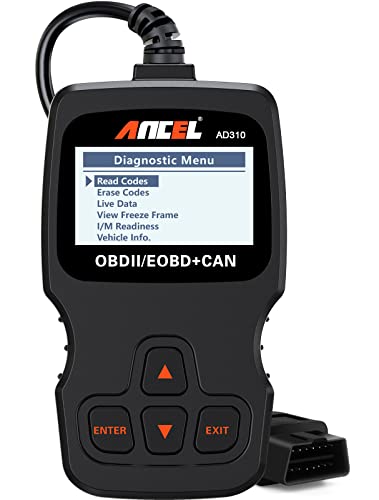
The ANCEL AD310 reads and clears emission-related engine codes and displays live data, freeze-frame information, I/M readiness, and vehicle information. It has a 2.5-foot cable and draws power from the vehicle’s OBDII connector, so it does not require a separate battery or charger.
Best for: Drivers who need essential engine-code information in a compact, direct-connect scanner. It was selected as a basic alternative for people who do not need advanced system access or active controls.
Limitation: Its listed functions do not include bidirectional tests or diagnosis of ABS, SRS, and transmission systems.
Buying Guide: How To Choose A Professional Car Diagnostic Tool
Which systems do you need to scan?
Start with the warning lights or systems you need to investigate. An engine-only OBD2 scanner is appropriate for check-engine and emissions-related work. Choose a multi-system tool such as the NT604 Elite if ABS, SRS, or transmission fault access is important. System coverage varies, so check the scanner’s vehicle and function support before buying.
Do you need live data or active controls?
Live data can show available values, such as engine speed or coolant temperature, while a code reader may provide only stored fault information. Bidirectional controls go further by sending commands to supported vehicle components. The Innova 5610 is the listed option with those controls, but its supported makes, models, and procedures are limited.
Is the tool for diagnosis, inspection readiness, or repair?
I/M readiness features help check monitor status; they do not certify that a vehicle will pass an inspection. A scanner identifies or clears supported codes, but it does not physically repair a fault. Choose a tool based on the information you need, and address the cause before clearing codes or relying on readiness results.
What should you verify before purchase?
Confirm the vehicle’s model-year and system compatibility, then compare the exact functions needed: code reading, live data, system coverage, resets, or active tests. A tool described as professional may still lack a specific service function. Check the product’s compatibility information rather than assuming that every scanner works with every vehicle.
Frequently Asked Questions
Can a diagnostic scanner fix a check-engine problem?
No. A scanner reads information and may clear supported codes, but it does not repair the mechanical or electrical cause of a warning.
Will every OBD2 scanner read ABS and SRS codes?
No. Basic OBD2 readers commonly focus on engine and emissions codes. Confirm that the specific scanner supports ABS or SRS diagnosis.
What is the difference between code reading and bidirectional scanning?
Code reading retrieves diagnostic information. Bidirectional scanning can also send commands to supported vehicle systems for certain active tests.
Can clearing a code make a vehicle inspection-ready?
Not necessarily. The fault may return, and readiness monitors may need to complete their checks. Use the scanner’s readiness information and repair the underlying issue.
Should a professional tool be universal?
Not always. Advanced functions may be limited to certain makes and models, so verify compatibility with the vehicle and the specific procedures you plan to use.